Stabeo is not publicly available yet. Information about the launch

For independent vehicle dealers

Your vehicles.
Your website.
Your business.

Manage your vehicles in one place. Get noticed with your own website. And make more of what drives your business every day.
Own website Central data management Extras as needed
From vehicle stock to your own website01
your-autohaus.de / vehiclesStabeo / vehicle managementExample · Display in a search engine
Vehicles  ·  About us  ·  Contact
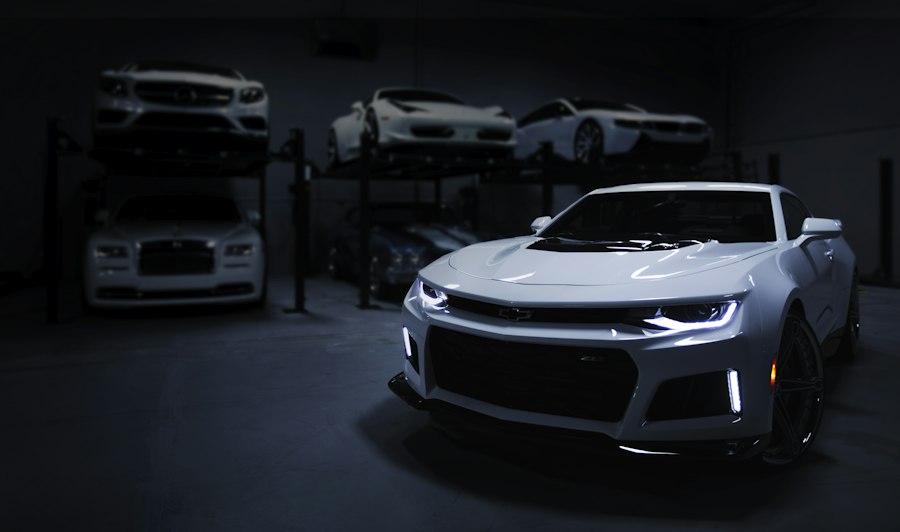
White coupé as an exemplary vehicle motifVehicle example

Camaro coupe

2021  ·  35.000 km  ·  Automatic

29.900 €Sample price
Own vehicle pageAll featuresDirect contact
Your vehicle inventory+ vehicle
24Vehicles in stock
110Vehicle features to choose from
Camaro coupe

2021 · 35.000 km

Active
Another example vehicle

Photos · Data · Description

Active
Manage data centrally and update your website.
Illustrative product preview · Example dataTry it yourself
Manage once.Present on your own website.
Made for the vehicle trade. Designed for your everyday work.Discover Stabeo

01 / Your own online presence

Your vehicles.
At your own address.

Your website is more than a business card. It gives your inventory its own place on the internet and gives interested parties a direct route to you.

Discover the next step
01

A vehicle. A dedicated offer page.

With vehicle data, photos and a description from your central management system. Changes appear on your website.

02

A foundation for organic visibility.

Page titles, metadata and structured vehicle data help search engines understand your offers. They cannot guarantee a ranking.

03

A clearer overview when updating vehicle data.

110 vehicle features, sensibly structured. Plus your own fields as well as templates and vehicle data in XLSX format.

Your vehicle inventory remains the starting point. Your own website grows from it.

02 / Stabeo in everyday life

Lots in it.
Clearly structured.

Discover the areas that matter to your vehicle business. At your own pace.

Everything in one place

Many features.
A clear structure.

Vehicle data, images, documents and descriptions belong together. Maintain your inventory centrally and add your own fields.

110 vehicle featuresCustom fieldsXLSX templatesImages & files

ON SITE

Take photos on site.
Continue in your inventory.

Photograph vehicles with a smartphone or tablet, indoors or on the forecourt. Use existing vehicle entries or create new ones and add the details later. When you save, the photos are assigned to the relevant vehicle. You can also prepare several vehicles in parallel.

Smartphone & tabletMultiple vehiclesAdd new vehicles

Your own place online

A website that shows
your inventory.

Select design directions, maintain your own content and present vehicles on your own offer pages. With technical basics for search engines.

Multiple designsOwn pagesVehicle listingsSEO basics
Try out design

Support when you need it

your pictures.
New possibilities.

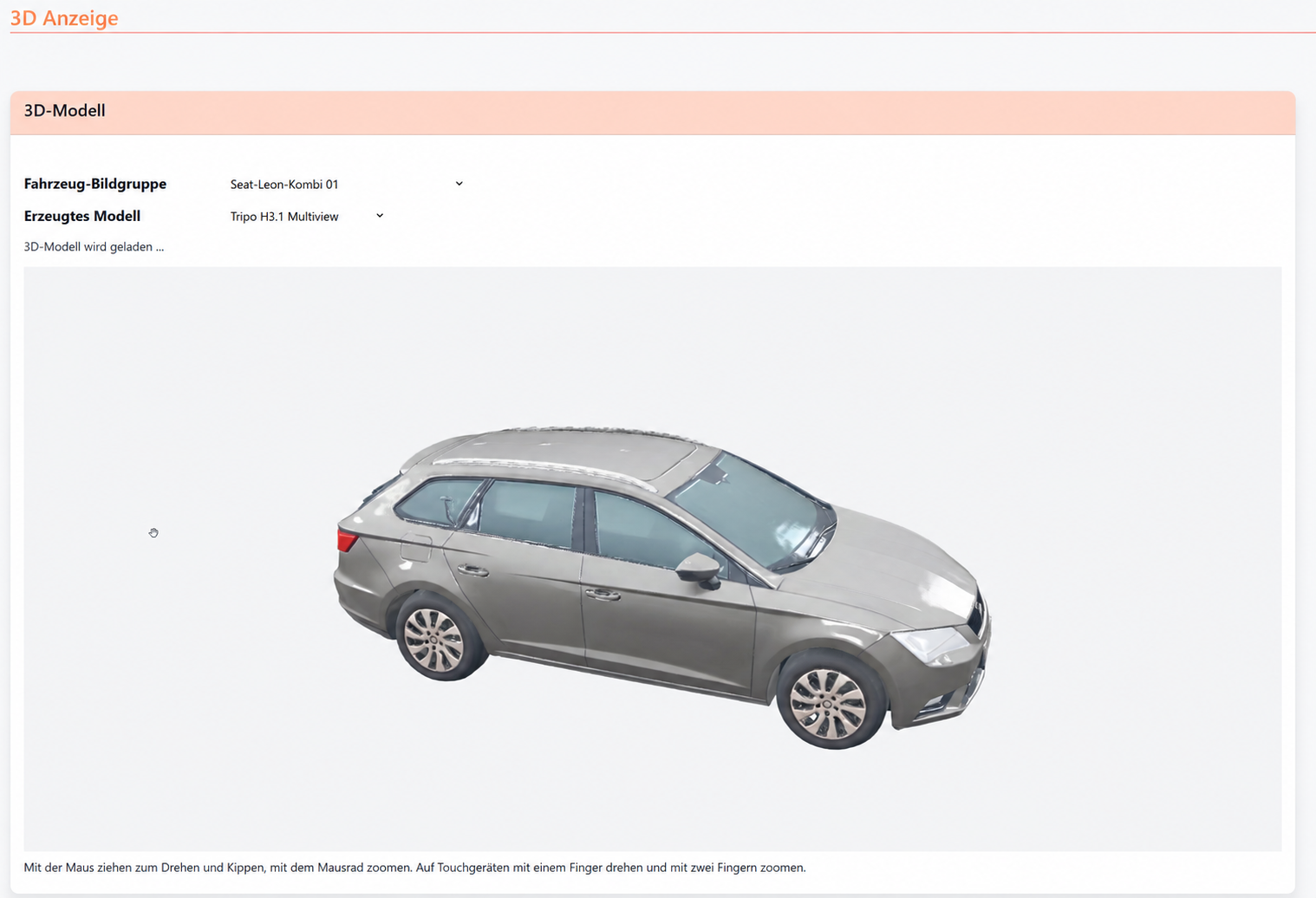
SmartTools support your work with text generation and background removal for vehicle photos. Interactive 3D models can also be created from four vehicle photos you have taken yourself.

Optional toolsText & imagesCredits at a glance

Working together

Your business.
Your collaboration.

Employee packages let you add staff access. Separate access for networked buyers, for example in the export business, is planned for later.

Employee packagesAdditional accessBuyer access planned
Discuss your needs
VEHICLE FEATURES / SCHEMATIC VIEWMOBILE PHOTO CAPTURE / EXAMPLE VIEWDEALER WEBSITE / EXAMPLE VIEW3D MODEL FROM VEHICLE PHOTOSCOLLABORATION / SCHEMATIC VIEW
Comfort +
Multimedia +
Interior +
Exterior +
Lighting +
Tyres & wheels +
Powertrain & environment −
Other +
Automatic start/stopParticulate filterHeat pumpPlug-in hybrid

Select structured features. Display them on the vehicle page.
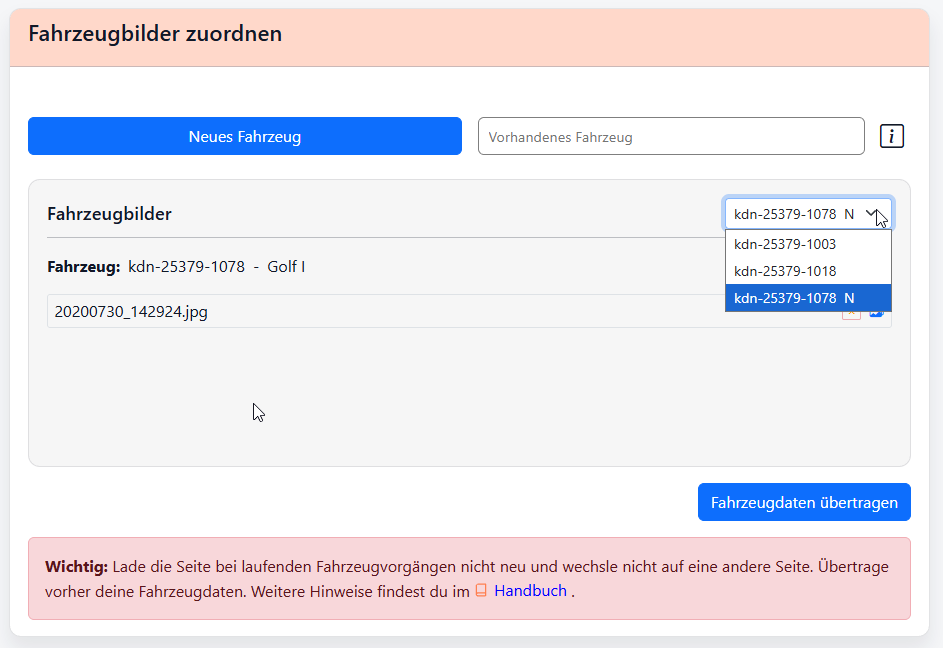
Mobile photo capture: select or add a vehicle and assign vehicle photos.
Vehicles  ·  About us  ·  Contact
White coupé as an exemplary vehicle motifVehicle example

Camaro coupe

2021  ·  35.000 km  ·  Automatic

29.900 €Sample price
Own vehicle pageAll featuresDirect contact
Edited screenshot of an internal 3D test; not an interactive model
IH
Your main accessManage your own business
Base
MA
Your employeesAdd extra access
Optional
EK
Connected buyersCollaboration in the export business
Planned

03 / Interactive design preview

Which website design
suits your dealership?

Four designs with example data. Compare desktop and mobile views.

Your car dealershipVehicles · About us · Contact
Vehicle example

Your next vehicle. At your car dealership.Discover vehicles. Find one that feels right.Ready for the next step.Distinctive vehicles. Personally selected.

Selected vehicles. Personal advice. Discover our sample inventory.

White coupé as an exemplary vehicle motif
Example design with vehicle data · not a finished dealership websiteSTABEO

A clear, familiar look with straightforward typography and an easy-to-scan presentation of your vehicles.

  • Clear blue and grey tones
  • Straightforward, readable type
  • Vehicles clearly at the centre
  • Easy-to-follow structure
  • Direct, understandable language
  • Restrained colour accents

A fresh, uncluttered look with soft greens and a calm presentation of your vehicle range.

  • Soft green and natural tones
  • Modern, clear typography
  • Generous vehicle photography
  • Airy, reduced layout
  • Friendly, open language
  • Subtle green accents

A striking look with dark surfaces, strong contrasts and an expressive presentation of your vehicles.

  • Dark surfaces, strong contrast
  • Bold, modern typography
  • Expressive vehicle photography
  • Clearly structured content areas
  • Short, direct language
  • Bright orange accents

A warm, personal look with elegant typography and room for carefully selected vehicles.

  • Warm cream and sand tones
  • Elegant serif typography
  • Generous image areas
  • Calm, clear structure
  • Personal language
  • Subtle golden accents

04 / Getting started

A strong base.
Extras when
you need them.

Start with the basic package. You can choose additional services and access to suit your business.

The base package

The basis for
your digital presence.

  • Manage vehicles and images centrally
  • Design your own dealership website
  • Translate website texts for free
  • Complete daily tasks independently

The basic package can also be used without the paid SmartTools.

Credits & SmartTools

Monthly included credit balance and optional additional credit packages.

Employee packages

Additional access if you want your team to collaborate.

We will present the scope and prices at launch.

Developed with a personal touch · Andernach

Understand technology.
Keep the vehicle trade in focus.

Behind Stabeo is Maku Webdruckdesign. We develop the platform for everyday work in the vehicle trade and value personal contact.

Get in touch

05 / Good to know

Still have
a question?

Here you will find the first answers.
For anything else, we are personally available to help.

Why do I need my own website as a car dealer?+

Your vehicles should be found beyond sales portals. With your own website, you establish a lasting online presence at your own web address, independent of Google and individual sales platforms. Your vehicle listings can also be found through search engines, and potential customers can contact you directly. With Stabeo, you manage your vehicle data centrally without having to enter it again for your website.

Do I have to use the AI functions?+

No. The paid SmartTools are optional extras. You can use the core vehicle management and your website without these services. Translating your website texts is free.

Can I view different designs?+

Yes. In this preview you can compare four website design styles. The vehicle data shown are examples.

Try out design
What does pre-registration mean?+

You are letting us know that you would like to learn more about Stabeo when it launches. Pre-registration is non-binding and does not constitute a paid order.

When can I start with Stabeo?+

Stabeo is still being developed and is not publicly available yet. By preregistering, you simply express your non-binding interest in its future launch. There is no fixed launch date at present.

The next step

Does Stabeo fit
your vehicle business?

Explore the possibilities. Request information or register your interest in the launch.

MK
Martin KullYour contact for Stabeo

Personal contact

Non-binding interest

Space for your questions

Let's stay in touch

Register your interest

Would you like to know more about Stabeo or do you have a question? Write to us.

We'll let you know when Stabeo launches.

Sending …

* Required fields · Your enquiry is non-binding.

* Required fields · Your pre-registration is non-binding.

Interactive design preview

Which website design suits your dealership?

Four illustrative website design styles with example data. Compare desktop and mobile views.

Your car dealershipVehicles · About us · Contact
Vehicle example

Your next vehicle. At your car dealership.Discover vehicles. Find one that feels right.Ready for the next step.Distinctive vehicles. Personally selected.

Selected vehicles. Personal advice. Discover our sample inventory.

White coupé as an exemplary vehicle motif
Example design with vehicle data · not a finished dealership websiteSTABEO
Example design with vehicle data · not a finished dealership websiteGet information about this

Example vehicle · Camaro coupe

This is how the introduction to your own vehicle details page could look: photos, specifications, equipment and direct contact with the dealership.

Vehicle
Camaro coupe · Illustrative image
Example data
2021 · 35.000 km · Automatic
Example price
29.900 €

This is not a real sales offer. On the future dealership website, the details will come from your vehicle inventory.

Screenshot from development or illustration photo; no operable application.

Mobile photo capture

Mobile photo capture with a choice of an existing vehicle and the option to add a new vehicle.

Step 01

Select a vehicle

Open mobile photo capture on your smartphone or tablet. Select a vehicle from your inventory. The photos you take next are collected for that vehicle.

Dialog for adding a new vehicle, with a predefined vehicle key and a field for the vehicle title.

Step 02

Add a new vehicle

Is the vehicle not in your inventory yet? First add it with a vehicle title. You can fill in the other details later. Skip this step for vehicles that already exist.

Dialog for adding several vehicle photos, with a list of the selected image files.

Step 03

Take photos on site

Photograph the vehicle indoors or on the forecourt and add the photos. You can switch between several prepared vehicles; the photos stay assigned to the relevant entry.

Selection of several prepared vehicle entries, showing the number of images for transferring the data together.

Step 04

Save photos with the right vehicles

Select the vehicle entries you have prepared and transfer the data. The photos are saved in the corresponding vehicle area. You can transfer several prepared vehicles together.

Thank you

We have received your enquiry. We will be in touch.